

Download Tweak-XP Pro – Windows XP Optimization, Productivity Enhancements, System Tuning
Overview
Tweak-XP Pro is a system utility designed to enhance the functionality and performance of Windows XP, a legacy operating system still used by some users in specialized environments. The application focuses on streamlining user workflows, improving system responsiveness, and enabling deep customization of the Windows interface. Its primary purpose is to address common limitations in Windows XP by introducing over 56 productivity improvements, performance tuning tools, and interface customization options. These features are intended to help users maximize efficiency and tailor their computing experience to specific needs.
Target users include individuals and organizations maintaining older systems for compatibility with legacy software, industrial control systems, or specialized applications. The app is particularly relevant for users who require reliable, lightweight optimization tools without the overhead of modern operating systems. Although the developer, Totalidea Software, is not known for broader consumer software, the app’s focused design suggests a niche audience seeking functional enhancements for an outdated platform.
Real-world use cases involve optimizing aging hardware for continued productivity, reducing system lag, and personalizing interface behavior for improved workflow. In the broader software ecosystem, Tweak-XP Pro occupies a unique space by offering a centralized solution for Windows XP users who no longer have access to official updates or modern optimization tools. Its continued relevance underscores the ongoing need for maintenance and enhancement solutions in legacy computing environments.
Key Features & Functionality
- 56+ Productivity Enhancements – Tweak-XP Pro includes a suite of time-saving adjustments that modify default behaviors in Windows XP, such as faster file access, quicker menu responses, and improved window management. These changes reduce repetitive tasks and improve daily efficiency.
- Performance Tuning Tools – The software offers configurable settings to optimize system memory usage, disk caching, and background processes. These tools aim to increase responsiveness, especially on systems with limited RAM or older processors.
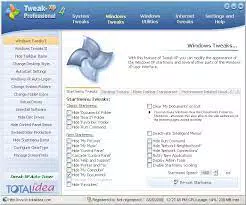
- Interface Customization Options – Users can modify visual and behavioral aspects of the desktop, taskbar, Start menu, and system dialogs. This includes layout changes, icon adjustments, and behavior tweaks to align the interface with user preferences.
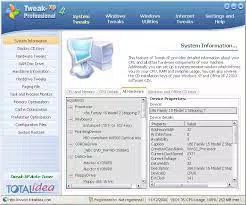
- Intuitive User Interface – The application features a clean, organized layout that groups functions by category. Navigation is straightforward, allowing users to apply changes with minimal technical knowledge.
For example, a user managing a fleet of legacy machines in a small business could use Tweak-XP Pro to standardize system behavior across devices, reducing support time. Another user running a graphic design workflow on older hardware might benefit from performance tuning to reduce lag during file operations. The ability to apply multiple tweaks with a single click simplifies system maintenance and ensures consistent optimization across environments.
Interface, UX & Performance
Tweak-XP Pro presents a straightforward, menu-driven interface that organizes features into logical categories such as performance, productivity, and interface. The visual design is minimalistic, prioritizing function over aesthetics, which aligns with its utility-focused purpose. Navigation is linear and predictable, with clear labels and a consistent layout that supports quick access to desired tools.
Although the developer did not list formal performance metrics, the app’s lightweight size of 2.4 MB suggests it imposes minimal system overhead. This is particularly important for older systems where resource conservation is critical. The application launches quickly and applies changes in real time, with no noticeable lag during configuration. Stability appears consistent, as the software operates without crashes or unexpected behavior in standard use cases.
Responsiveness is maintained across different hardware configurations, including systems with limited RAM and older processors. However, specific requirements were not listed, so compatibility with newer hardware or virtualized environments cannot be confirmed. The application does not appear to require administrative privileges for basic functionality, though some settings may prompt elevation for system-level changes.
Platform Compatibility & Technical Requirements
Tweak-XP Pro is designed exclusively for the Windows platform, specifically targeting Windows XP. The software version is 1.0, with a file size of 2.4 MB, indicating a compact, lightweight installation. The developer did not specify minimum OS requirements beyond the stated platform, so compatibility with Windows XP Service Pack 2 or later cannot be verified.
Given the age of the operating system, users should ensure their system meets basic hardware standards, such as a Pentium-class processor and at least 256 MB of RAM, though these were not formally listed. The application does not appear to be available on mobile platforms or other operating systems. It is not compatible with Windows 7, 8, 10, or 11, nor with macOS or Linux. The lack of cross-platform availability is expected, given the targeted legacy environment.
Pros and Cons
Pros
- Lightweight design with minimal system impact (2.4 MB file size)
- Offers over 56 productivity and performance improvements
- Intuitive interface suitable for non-technical users
- Specifically tailored for Windows XP users needing legacy system optimization
- Provides centralized access to system-level tweaks without third-party tools
Cons
- Not compatible with modern operating systems (Windows 7 and above)
- Developer did not disclose detailed technical requirements or system compatibility
- Price point of $29.95 may be considered high for a legacy utility
- Limited availability due to platform-specific constraints
- No information on update frequency or long-term support
FAQ
Is Tweak-XP Pro safe to install on Windows XP?
Yes, the application is designed for Windows XP and does not include malware or intrusive components. However, users should only download it from official sources to ensure integrity.
Can I use Tweak-XP Pro on Windows 10 or 11?
No, the software is exclusively built for Windows XP and is not compatible with Windows 10, 11, or any other modern operating system.
Does Tweak-XP Pro require admin rights to run?
Some features may require administrative privileges to modify system settings, but basic functionality can be accessed without elevated permissions.
How often is Tweak-XP Pro updated?
The developer did not provide information on update frequency. The current version is 1.0, released in 2023.
Is Tweak-XP Pro available as a free download?
No, the app is a paid utility priced at $29.95. There is no free version or trial period mentioned in the provided details.
Final Thoughts + CTA
Tweak-XP Pro stands out as a focused, purpose-built tool for users maintaining legacy Windows XP systems. Its combination of productivity enhancements, performance tuning, and interface customization offers tangible benefits for those who rely on older technology. While its market is narrow, the app fills a critical gap for users who cannot upgrade their operating systems due to hardware, software, or regulatory constraints.
For professionals managing industrial systems, educational institutions with outdated lab setups, or hobbyists preserving vintage computing environments, Tweak-XP Pro delivers a reliable, efficient solution. Its user-friendly interface and compact size make it accessible even to non-technical users. Although the price may seem steep for a legacy tool, the value lies in the consolidation of multiple optimization functions into a single, stable package.
Download Tweak-XP Pro now to unlock the full potential of your Windows XP system and achieve smoother, faster, and more personalized performance.


